Ashampoo® Photo Commander 17 Pro : Photo Management aur Editing ka Ultimate Hub
Aaj ke digital daur me hum sab hazaron photos click karte hain. Shaadi-party ki pictures hon, travel memory ho ya personal shoots—sab kuch humare hard drive me scattered pada rehta hai. Photos ko properly organize karna, remove duplicates find karna, aur unko touch-up dena ek bhot bada headache ban jata hai.
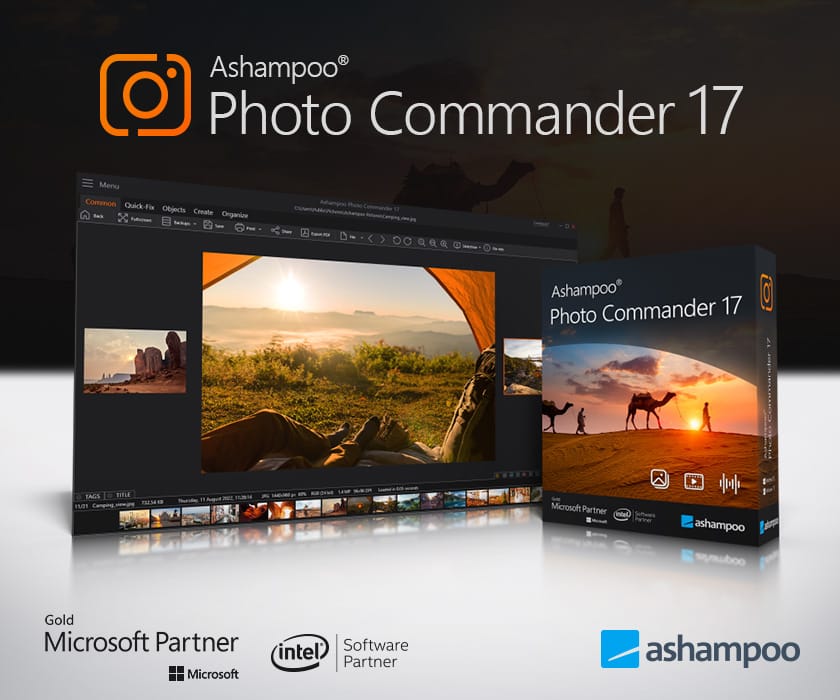
Agar aap bhi isi problem se jhujh rahe hain, toh Ashampoo Photo Commander 17 Pro aapke liye ek complete “all-in-one” solution hai. Yeh software na sirf aapke photos ko manage karta hai, balki editing, design, aur presentation ko bhi super fast banata hai.
What is Ashampoo Photo Commander 17 Pro?
Ashampoo Photo Commander 17 Pro ek Powerful Desktop Software hai jo Photo Management, Photo Editing, aur Media Creation tools ko ek jagah lata hai. Iska main purpose aapke bikhre hue photo library ko clean, organized, aur presentable banana hai.
Chahe aap ek beginner hon jise simple one-click fixes chahiye, ya ek enthusiastic photographer jise batch editing aur metadata management ki zaroorat ho, yeh program dono type ke users ke liye best fit hai.
Key Features Jo Isse Khaas Banate Hain
1. Ultra-Fast Speed aur Performance Improvement
Version 17 ki sabse badi baat iska 64-bit architecture aur AVX support hai. Purane versions ke mukable yeh 40% tak fast hai. Badi se badi photo libraries ya heavy RAW files ko browse aur load karte waqt lag nahi milta.
2. Smart Photo Organization aur Duplicate Finder
- Geotagging & Maps: Agar aapke photos me GPS metadata hai, toh yeh software unhe map par visualize kar deta hai.
- Duplicate Cleaner: Drive par padhe duplicate photos ko detect karke space free karta hai.
- Filter & Tagging: Date, format, tag, ya rating ke hisab se photos ko instantly search kar sakte hain.
3. One-Click & Manual Editing Tools
Photos me color, brightness ya contrast ki kami ho? Bus ek click me Auto-Optimization tool automatic corrections kar deta hai.
- Red-eye removal
- Noise, scratches, aur spots ko remove karna
- Color temperature, gamma, aur sharpness adjust karna
- Modern WebP aur PNG formats ko JPEG me convert karna
4. Creative Templates (Collages, Cards, & Calendars)
Photo Commander 17 sirf editing tak simit nahi hai. Isme ready-to-use templates milte hain jinse aap:
- Birthdays ya Festivals ke liye Greeting Cards
- Photo Collages aur Frames
- Custom Photo Calendars aur Slideshows bana sakte hain.
5. Multi-Monitor Presentation
Agar aap presentation de rahe hain, toh Multi-Monitor mode aapko presentation control panel ek screen par aur 4K presentation dusri screen par run karne ki permission deta hai. Background music aur Ken Burns effect ke sath slideshows aur bhi engaging lagte hain.
Batch Processing: Time Saving Machine
Maan lijiye aapke paas 500 photos hain aur un sabko rename karna hai, format change karna hai, ya watermark lagana hai. Ek-ek karke karna me ghanto lag jayenge. Is software ka Batch Processing Wizard yeh sabhi tasks seconds me single command par execute kar deta hai.
Software Specifications & System Requirements
| Parameter | Specification |
| Operating System | Windows 10 & Windows 11 (Full support) |
| Architecture | Native 64-bit |
| Supported Formats | JPG, PNG, WEBP, JXR, RAW, RAW Formats, MP4, etc. |
| Ideal For | Photographers, Content Creators, Home Users |
Pros & Cons
Pros:
- Clean aur intuitive user interface
- Windows 11 ke saath smooth compatibility
- Photo management + editing ka complete 2-in-1 combo
- Advanced Duplicate Detector
- One-time purchase options (No subscription trap)
Cons:
- High-end AI-based generative tools (like modern Photoshop) missing hain.
- Advanced color grading ke liye Adobe Lightroom jaisa precise control nahi milta.
Final Verdict: Kya Aapko Yeh Kharidna Chahiye?
Agar aap Adobe Subscription (Photoshop/Lightroom) ke heavy monthly cost se bachna chahte hain aur aapko ek aisa tool chahiye jo aapki saari photos ko maintain kare, duplicate clean kare, aur fast edit karke presentation ready bana de—toh Ashampoo Photo Commander 17 Pro aapke PC ke liye ek must-have software hai.
Yeh beginners ke liye effortless aur power-users ke liye extremely time-saving tool hai.
Agar aap Ashampoo Photo Commander 18 ke features aur update process ke bare me practically dekhna chahte hain, toh Ashampoo Photo Commander video overview zarur dekhein.
Yeh video software ke practical duplicate scanning, slideshow, aur collage features ko clear visual demo me explain karta hai.
Get Latest Ashampoo® Photo Commander 17 Pro Licence Key
Ashampoo Photo Commander 17 Pro
AP17A8-772510-800BA9AP17AC-77B662-5E4E70AP17A8-7718F6-C69982AP17AE-77AD49-772729